Imagine hitting “Apply Now” on a role that matches your skills almost perfectly. You have the right qualifications, you know you can do the job well, and you wait eagerly for an email inviting you to an interview. Days pass, then weeks, until an automated rejection message drops into your inbox.
It feels frustrating, but you are far from alone.
Recruiters spend an average of six to seven seconds on their initial scan of a resume. During that brief window, subtle formatting glitches, vague job descriptions, or minor layout errors can cost you the interview. Hiring teams process hundreds—sometimes thousands—of applications for a single open position. To handle that volume, they rely on quick visual scans and Applicant Tracking Systems (ATS) to filter out candidates who do not meet their visual or structural standards.
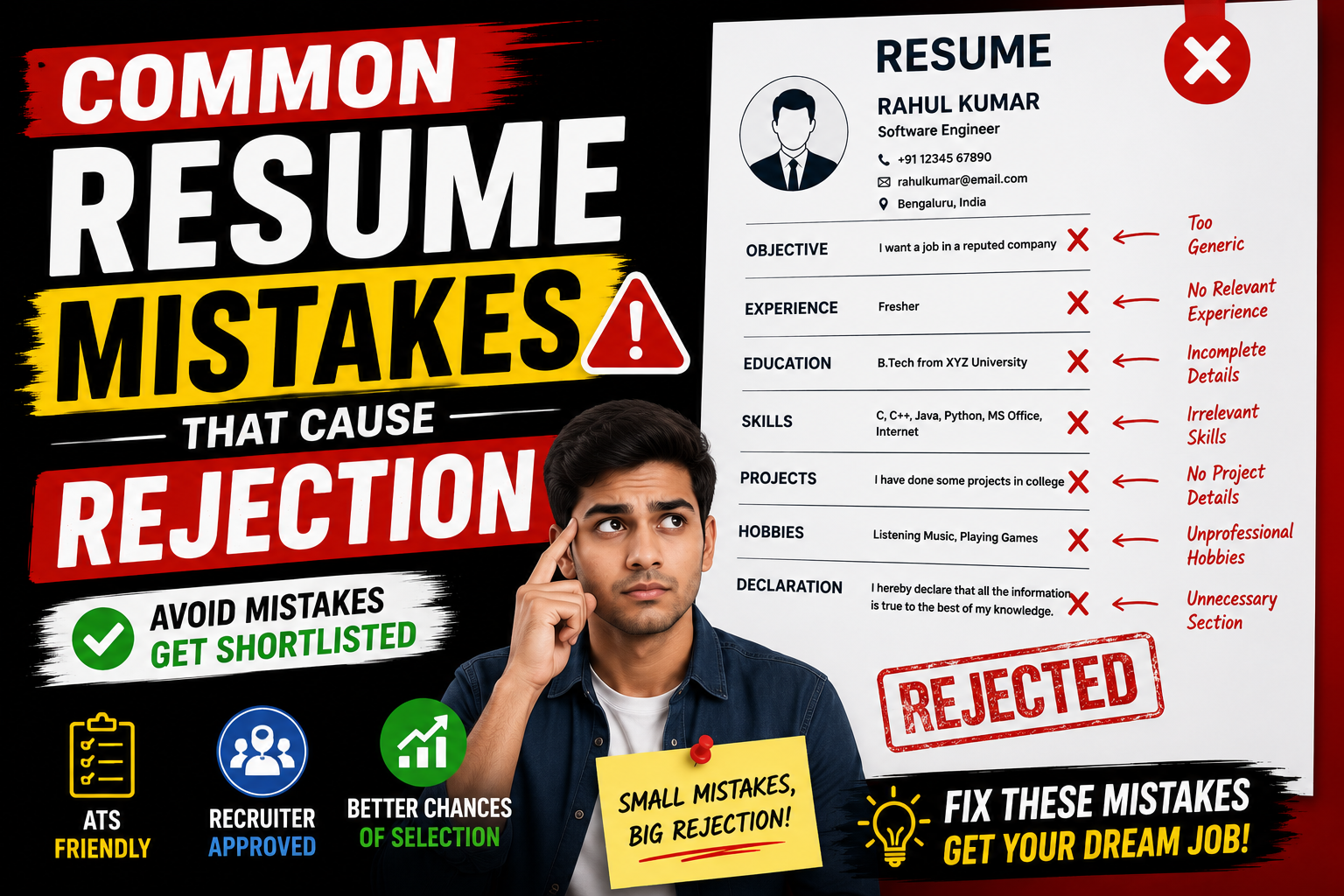
Understanding common resume mistakes that cause rejection is the fastest way to turn your application strategy around and start landing callbacks.
Quick Summary Box
| Feature | Details |
| Best For | Job seekers, recent graduates, freshers, and career changers |
| Price / Cost | Free (Self-audit and manual editing) |
| Difficulty Level | Beginner to Intermediate |
| Key Benefits | Higher response rate, passes ATS filters, highlights measurable impact, projects professionalism |
What Is Resume Screening (and Why Rejections Happen)?
- Quick Summary Box
- What Is Resume Screening (and Why Rejections Happen)?
- Why Employers Reject Resumes So Quickly
- Core Elements of an Error-Free Resume
- How Candidate Tracking Systems & Recruiters Review Resumes
- Practical Use Cases: Freshers vs. Experienced Professionals
- Step-by-Step Guide: How to Fix Common Resume Mistakes
- Benefits of an Optimized Resume
- Limitations & Realities of Resume Writing
- Pros and Cons: Standard Format vs. Heavy Graphic Design
- Comparison: Common Resume Mistakes vs. Recommended Fixes
- Tools to Help You Improve Your Resume
- Deep Dive: The Top Common Resume Mistakes That Cause Rejection
- Frequently Asked Questions (FAQs)
- 1. How long should my resume be?
- 2. Is a PDF or Word document better for job applications?
- 3. Should I include my full home address on my resume?
- 4. How far back should my work experience go?
- 5. Should I list high school education on a professional resume?
- 6. Can I use a two-column resume format?
- 7. How do I handle employment gaps on my resume?
- 8. Do recruiters actually read cover letters?
- 9. Should I include references directly on my resume?
- 10. How many keywords should I add to pass ATS checks?
- Final Thoughts
Resume screening is the initial phase of the hiring process where an automated parser, a recruiter, or a hiring manager reviews your document to judge whether your experience fits an open position.
Rejections rarely happen because an applicant is incapable of doing the job. More often, candidates fail to communicate their capabilities clearly within those critical first few seconds of review.
+------------------+     +-------------------+     +--------------------+
| Job Application  | --> |  ATS Auto-Parser  | --> | Recruiter 6-Second |
|    Submitted     |     | (Filters Format & |     |   Visual Scan      |
|                  |     |    Keywords)      |     |                    |
+------------------+     +-------------------+     +--------------------+
                                                             |
                                                             v
                                                   +--------------------+
                                                   | Interview Invite   |
                                                   |     or Rejection   |
                                                   +--------------------+
A strong resume acts as a personal marketing document. If the document is cluttered, difficult to scan, or packed with generic buzzwords, the reader moves on to the next candidate immediately.
Why Employers Reject Resumes So Quickly
Hiring managers need to reduce a stack of 300 applicants down to 5 or 10 candidates for phone interviews. They search for reasons to disqualify resumes rapidly to save time.
Here are the primary reasons behind fast rejections:
- Information Overload: Overwhelming text blocks make key details hard to locate quickly.
- Lack of Relevance: Experience listed does not align with the specific job description.
- Parsing Failures: Complex graphics or non-standard fonts cause automated ATS parsers to extract garbled data.
- Unclear Impact: Statements describe basic job duties rather than actual achievements.
Core Elements of an Error-Free Resume
A solid resume relies on a simple, readable structure that helps human readers and software parsers find key details instantly.
+-------------------------------------------------------+
|                 CONTACT INFORMATION                   |
|     Name | Email | Phone | Location | LinkedIn        |
+-------------------------------------------------------+
|                 PROFESSIONAL SUMMARY                  |
|  2-3 concise lines focused on role & key strengths    |
+-------------------------------------------------------+
|                 TECHNICAL / CORE SKILLS               |
|      Categorized list of relevant tools & skills      |
+-------------------------------------------------------+
|                 WORK EXPERIENCE                       |
|  Company | Role Title | Dates                         |
|  • Action Verb + Context + Quantifiable Result        |
|  • Action Verb + Context + Quantifiable Result        |
+-------------------------------------------------------+
|                 PROJECTS & EDUCATION                  |
|  Relevant degrees, certifications, or projects        |
+-------------------------------------------------------+
Every resume should consistently feature these essential sections:
- Clear Header: Accurate contact details, including professional email, city/state or general location, phone number, and a clean LinkedIn profile link.
- Tailored Summary: A brief 2-to-3 line overview explaining who you are, what you specialize in, and what value you bring to the employer.
- Categorized Skills: Relevant hard and soft skills grouped logically for fast reading.
- Impact-Driven Work Experience: Chronological bullet points structured around action verbs and quantifiable results.
- Education & Certifications: Simple background details placed near the end (unless you are a recent graduate showcasing relevant coursework).
How Candidate Tracking Systems & Recruiters Review Resumes
Understanding how applications move through modern hiring pipelines helps you design a document that passes every check.
1. Applicant Submits Resume (PDF / Docx)
                 │
                 ▼
2. ATS System Extracts Plain Text
   ├─ Checks keyword matches against Job Description
   └─ Parses headers, work dates, and job titles
                 │
                 ▼
3. Recruiter Visual Review (Top 15% of Applicants)
   ├─ Reads top section & work history headers
   └─ Looks for measurable outcomes & relevant tools
                 │
                 ▼
4. Final Shortlist for Interview Call
The ATS Stage
When you submit your application through a company portal, an Applicant Tracking System parses the document into plain text format. It scans for specific skills, job titles, and qualifications that match the job description. If your formatting blocks this parsing, the software rates your match score low, and human eyes may never review it.
The Recruiter Review Stage
When your application reaches a human recruiter, they perform a quick scanning pattern (often an “F-pattern”). They scan your current job title, current company, dates of employment, core skills section, and educational background. If these elements are not positioned where they expect them to be, they move to the next candidate.
Practical Use Cases: Freshers vs. Experienced Professionals
Resume strategies vary depending on where you are in your career journey.
Scenario A: Recent Graduate / Fresher
A candidate who graduated with a computer applications degree might lack long-term industry work experience.
- The Wrong Approach: Filling space with high school history, personal hobbies, or listing basic job duties without context.
- The Effective Approach: Highlighting practical coursework, hands-on projects, open-source contributions, and relevant technical skill categories right below the summary section.
Scenario B: Experienced Professional
A developer or marketing specialist with 5+ years of experience needs to show steady career progress.
- The Wrong Approach: Listing long paragraphs describing daily tasks from an entry-level job completed seven years ago.
- The Effective Approach: Condensing early experience down to short bullet points and emphasizing recent roles using metrics like percentages, revenue growth, or time saved.
Step-by-Step Guide: How to Fix Common Resume Mistakes
To upgrade your resume from an application that gets ignored into a document that lands interviews, work through this step-by-step audit.
Step 1: Simplify Format ──► Step 2: Tailor Keywords ──► Step 3: Quantify Achievements ──► Step 4: Proofread
Step 1: Clean Up Layout and Formatting
- Use a single-column or clean two-column layout using standard standard fonts like Arial, Helvetica, Calibri, or Inter.
- Set standard margins (0.5 inch to 1 inch) and maintain consistent spacing throughout the document.
- Export your resume as a standard PDF file unless the job posting explicitly requests a Word document (
.docx).
Step 2: Align Your Skills with the Job Description
- Read the job description carefully and pick out core required tools, frameworks, and qualifications.
- Integrate those exact keywords naturally into your technical skills section and experience bullet points.
- Avoid dumping long lists of irrelevant skills that do not fit the specific target role.
Step 3: Rewrite Experience Bullets for Impact
- Replace weak responsibilities (e.g., “Responsible for managing database queries”) with active statements (e.g., “Optimized SQL database queries, reducing query response times by 35% across core production databases”).
- Use the simple formula: Action Verb + Context/Task + Measurable Outcome.
Step 4: Perform a Comprehensive Proofread
- Read your resume aloud to catch awkward phrasing or run-on sentences.
- Use tools like Grammarly or LanguageTool to spot typos, spelling errors, and grammar inconsistencies.
Benefits of an Optimized Resume
Investing time into cleaning up layout errors and refining content pays off quickly across your job search:
- Faster Callbacks: Clear, scannable layouts help hiring teams recognize your qualifications immediately.
- Higher ATS Compatibility: Standard structural headers ensure your data parses cleanly into company databases.
- Better First Impressions: Error-free formatting demonstrates high attention to detail and professional standards.
- Stronger Salary Negotiation Positioning: Clean bullet points that highlight clear metrics establish your value early in the interview cycle.
Limitations & Realities of Resume Writing
Fixing resume mistakes is crucial, but it is helpful to keep realistic expectations in mind:
- A Resume Alone Will Not Guarantee a Job: A clean resume opens the door to an interview call, but technical evaluations, behavioral interviews, and culture fit carry you across the finish line.
- Over-Optimization Risks: Keyword-stuffing your document to trick an ATS results in text that sounds robotic to human recruiters, which leads to rejections at the manual review stage.
- Market Conditions Matter: When competition is high for entry-level positions, even an excellent resume requires networking, referrals, and tailored portfolio projects to stand out.
Pros and Cons: Standard Format vs. Heavy Graphic Design
| Evaluation Criteria | Standard Simple Formatting | Graphic / Visual Formatting |
| ATS Parsing Accuracy | High (Parses cleanly) | Low (Text blocks & tables get garbled) |
| Recruiter Readability | High (Familiar, fast to scan) | Medium to Low (Cluttered layout) |
| Preparation Effort | Low to Medium | High (Requires design software) |
| Best Suited For | Tech, Finance, Business, Corporate Roles | Creative Portfolios, Design Roles (as supplementary work) |
Comparison: Common Resume Mistakes vs. Recommended Fixes
| Common Mistake | Why It Causes Rejection | How to Fix It |
| Using Graphical Skill Rating Bars | ATS parsers cannot interpret icons, and visual progress bars do not convey actual skill level. | Replace graphics with clear text lists categorized by expertise (e.g., Languages: Java, Python, SQL). |
| Including Passive Task Lists | Describing basic duties leaves recruiters unsure of your real abilities. | Focus on action verbs combined with measurable outcomes and clear results. |
| Using Unprofessional Email Addresses | Informal email handles project an unprofessional image. | Use a simple email format like firstname.lastname@gmail.com. |
| Submitting Unformatted Multi-Page Resumes | Multi-page resumes packed with irrelevant details cause recruiter fatigue. | Keep early-career resumes to 1 page; limit experienced roles to 2 focused pages. |
| Unexplained Employment Gaps | Unexplained gaps can raise questions for hiring managers. | Add short contextual notes (e.g., Career Break – Professional Upskilling & Certifications). |
Tools to Help You Improve Your Resume
Instead of relying purely on visual design apps that clutter layouts, consider these practical resources to polish your content:
- Jobscan or Resumesect: Useful for checking your resume against specific job postings to spot missing keywords and parsing issues.
- Grammarly or Hemingway Editor: Excellent for catching grammatical mistakes, run-on sentences, and passive tone.
- Canva (Simple Text Templates) or Reactive Resume: Great open-source or simple web applications for generating clean, single-column plain-text layouts.
Deep Dive: The Top Common Resume Mistakes That Cause Rejection
Let us review the specific errors that trigger fast rejections during recruiter visual reviews and ATS evaluations.
1. Using Graphic Skill Bars and Complex Layouts
Skill bars that show “80% proficiency in Python” or “4/5 stars in Communication” look modern, but they fail during evaluation. An ATS cannot convert visual progress bars into text data. Furthermore, visual ratings prompt hiring managers to question what the missing percentage represents. List your skills in clear, text-based categories instead.
2. Missing Measurable Achievements
Writing “Responsible for handling client support tickets” tells a recruiter what your duties were, but it says nothing about how well you performed them.
3. Vague Summaries or Outdated Objectives
Traditional objective statements focused on what you wanted from a company (e.g., “Seeking an entry-level software role to grow my skills”). Modern hiring standards favor a brief professional summary that states what value you bring to the team from day one.
4. Typos, Misspellings, and Inconsistent Formatting
Spelling errors, inconsistent date formats (mixing Jan 2024 with 05/2023), or switching font styles mid-document signal a lack of attention to detail. Always double-check formatting consistency across headings, dates, and bullet margins.
Frequently Asked Questions (FAQs)
1. How long should my resume be?
For candidates with less than five years of experience or recent graduates, a single-page resume is standard. Candidates with extensive experience can use a clean two-page document, provided every section contains relevant, high-impact details.
2. Is a PDF or Word document better for job applications?
A standard PDF maintains your formatting across different screens and operating systems. However, if a job application portal explicitly requests a .docx file, upload a Word document to match their parser requirements.
3. Should I include my full home address on my resume?
No. Including your full street address is an unnecessary privacy risk. Listing your city, state/region, and country (e.g., Delhi, India or Austin, TX) provides all the location context recruiters need.
4. How far back should my work experience go?
Generally, focus on the last 10 to 15 years of work history. Older roles can be summarized in a short section or omitted if they are no longer relevant to your target role.
5. Should I list high school education on a professional resume?
Once you complete or enroll in higher education (degree programs, diplomas, or trade certifications), remove high school details entirely. Focus your space on recent, relevant education and practical projects.
6. Can I use a two-column resume format?
Simple two-column layouts can work well if created properly in Word or Docs. However, avoid using embedded text boxes, floating elements, or complex visual graphics, as these confuse ATS parsers.
7. How do I handle employment gaps on my resume?
Be honest and concise. Use brief entries to explain gaps, such as Professional Development, Freelance Projects, or Family Leave. Focus on any relevant skills, certifications, or projects completed during that time.
8. Do recruiters actually read cover letters?
Some recruiters skip cover letters during their initial visual scan, but many hiring managers use them to decide between two top-ranked candidates. Writing a concise, tailored cover letter is always a safe best practice.
9. Should I include references directly on my resume?
No. Phrases like “References available upon request” waste valuable resume space. Prepare a separate references page and share it only when requested by a recruiter.
10. How many keywords should I add to pass ATS checks?
Focus on relevant skill matches rather than keyword volume. Integrate key tools, technology names, and qualifications naturally into your summary, skills section, and experience bullet points without forcing repetitive keywords.
Final Thoughts
Fixing common resume mistakes is one of the highest-return career steps you can take. You do not need overly elaborate visual templates or expensive design software to get noticed by recruiters.
Focus on clear formatting, precise keyword alignment with the job posting, and bullet points built around measurable results.